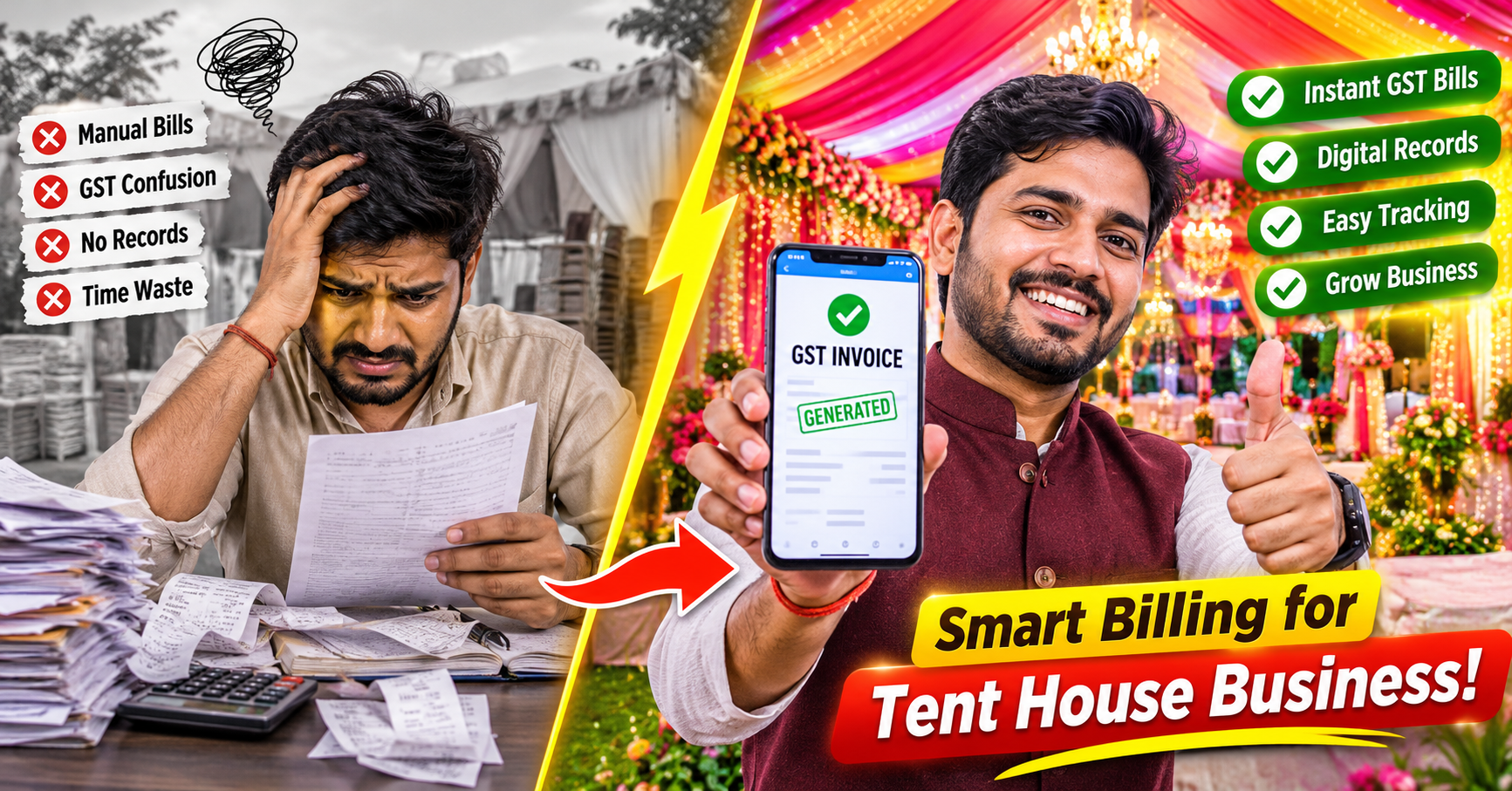
Tent House ka GST Bill Mobile se kaise banayein? Step-by-Step Guide
Tent house business mein har booking ke baad GST bill banana zaroori hai — lekin zyada tar owners manual kaam karte hain ya CA par depend karte hain. Is guide mein jaanein mobile se professional GST invoice banane ka step-by-step tarika.

मेहंदी आर्टिस्ट अपनी ब्राइडल बुकिंग और टीम कैसे मैनेज करें?
Key Takeaways & Executive Summary
The main points at a glance
- Rs 20 lakh se zyada turnover wale tent house owners ke liye GST billing legally mandatory hai
- Mobile apps se GST invoice banana ab sirf 2-3 minute ka kaam hai — CA ki zarurat nahi
- Proper GST bill se bade B2B customers attract hote hain jo Input Tax Credit claim karna chahte hain
- Event-specific billing apps jaise LaganBook generic accounting software se tent house ke liye zyada suitable hain
- Monthly GST summary export karo — return filing stress-free ho jaayegi
- 1.GST Bill kya hota hai aur Tent House ke liye kyun zaroori hai?
- 2.Pehle Zaruri Cheezein: Setup karo ek baar, bill banao baar baar
- 3.Mobile Billing Apps ka Comparison — Konsa Best hai Tent House ke liye?
- 4.LaganBook App se GST Bill kaise banayein: Step-by-Step Guide
- 5.Valid GST Invoice ke liye Complete Checklist
- 6.Common Mistakes jo Tent House Owners karte hain — Inhe Avoid Karein
- 7.GST Return Filing ke liye Bill Records kaise rakhein?
- 8.LaganBook se Apna Tent House Business Digitize Karein — Aaj Hi Shuru Karein
- 9.Frequently Asked Questions
GST Bill kya hota hai aur Tent House ke liye kyun zaroori hai?
GST (Goods and Services Tax) bill ek legal document hai jo aapki services ki sale prove karta hai. Jab bhi aap kisi customer ko tent, shamiana, chairs, tables, generator, ya koi bhi event equipment dete hain, toh aapko GST invoice banana chahiye.
Agar aapka annual turnover Rs 20 lakh se zyada hai (special states mein Rs 10 lakh), toh GST registration aur proper invoicing mandatory hai. Iske alawa, bade B2B customers — jaise hotels, caterers, corporate event organizers — sirf unhi vendors se deal karte hain jo proper GST invoice de sakein, kyunki unhe Input Tax Credit (ITC) claim karni hoti hai.
- Legal compliance: GST registered business ko har taxable supply par invoice dena compulsory hai
- Input Tax Credit: Customer bhi GST registered ho toh woh aapke bill se ITC claim kar sakta hai
- Reputation: Professional vendors sirf unhi suppliers ke saath kaam karte hain jo proper bills dete hain
- GST Return filing: Monthly/quarterly returns ke liye accurate billing records chahiye
- Dispute resolution: Payment argument mein legal evidence ka kaam aata hai
Pehle Zaruri Cheezein: Setup karo ek baar, bill banao baar baar
Mobile se GST bill banane se pehle yeh information ready rakhein. Aapki business details: GST Identification Number (GSTIN) — 15 digit ka unique number; business ka registered naam aur address; contact number aur email; bank account details (optional lekin professional lagta hai).
Service details ke liye: kya kya diya (tent, shamiana, chairs, generator), quantity aur rate per item. HSN/SAC code — event decoration/tent services ke liye SAC code 997212 use hota hai. GST rate: Tent house/event decoration services par generally 18% GST lagta hai (9% CGST + 9% SGST intra-state ke liye).
Ek real case: Suresh Tent House, Bhopal — pehle woh har booking ke liye manually bill likkhte the aur ek notebook mein hisaab rakhte the. Jab woh LaganBook app use karne lage, toh unki billing time 20 minutes se ghatakar sirf 2 minutes reh gayi. Ab woh ek mahine mein 150+ professional GST invoices generate karte hain bina kisi confusion ke.
Mobile Billing Apps ka Comparison — Konsa Best hai Tent House ke liye?
Generic apps jaise Vyapar, Tally, ya Zoho Books basic billing toh kar dete hain, lekin tent house ke specific needs — equipment tracking, event-wise billing, partial payment management — ke liye woh ideal nahi hain.
LaganBook specifically Indian tent house, shamiana, DJ, caterer aur decorator businesses ke liye banaaya gaya hai. Ismein readymade tent house item catalog, event-wise booking tracking, automatic GST calculation, WhatsApp pe direct bill share, payment reminders, aur godown stock se auto-link — sab kuch built-in hai.
- Tent house items ka readymade catalog — sirf tap karke add karein
- Event-wise booking tracking — sab organized ek jagah
- GST invoice automatic calculation — 18% instantly apply hoti hai
- WhatsApp pe direct PDF bill share — ek tap mein
- Automatic payment reminder — manually yaad dilane ki zarurat nahi
- Godown stock se bill auto-link — overselling ka risk zero
LaganBook App se GST Bill kaise banayein: Step-by-Step Guide
Step 1 — App Download aur Account Setup: LaganBook app apne Android ya iOS phone mein download karein. Register karein apna naam, mobile number, aur business naam. Settings mein jaake GSTIN enter karein. Apni services ka basic rate card set karein — ek baar karo, baar baar kaam aayega.
Step 2 — New Booking Create Karein: Dashboard par 'New Booking' button tap karein. Customer ka naam, event date, venue, aur contact details bharein. Event type select karein (wedding, birthday, corporate). Required items add karein: Shamiana 40x60, Plastic Chairs (200), Round Tables (20), Generator 7.5KVA, etc.
Step 3 — Invoice Generate Karein: 'Generate Invoice' tap karein. App automatically calculate karega: Base amount + 18% GST + Total amount. Payment terms set karein: advance amount aur balance payment due date. Invoice preview dekhein aur check karein.
Step 4 — Customer ko Bill Bhejein: 'Share via WhatsApp' tap karein — seedha customer ke number par PDF bill chala jaayega. 'Email' option se professional email bhi bhej sakte hain. Ek click mein bill print bhi kar sakte hain agar customer printed copy chahta hai.
Step 5 — Payment Record Karein: Jab customer advance deta hai, 'Record Payment' tap karein. Payment mode choose karein: Cash, UPI, Bank Transfer, Cheque. Balance payment automatically calculate ho jaata hai. Automatic payment reminder bhi set kar sakte hain event date se pehle.
Ek real case: Vijay Events, Lucknow — pehle woh WhatsApp par manually type karke bill ka screenshot bhejte the. Customers confuse ho jaate the kyunki koi proper format nahi tha. LaganBook use karne ke baad, unke customers khud kehne lage ki 'bhaiya aap toh bahut professional ho gaye!' Aur importantly, payment disputes zero ho gaye.
Valid GST Invoice ke liye Complete Checklist
Ek valid GST tax invoice mein yeh sab elements hone chahiye. LaganBook automatically in sab cheezein ko bill mein include karta hai, toh aapko manually kuch check karne ki zarurat nahi padti.
- 'Tax Invoice' heading clearly likha ho
- Invoice number sequential order mein (e.g., TH/2026-27/001)
- Invoice date aur supplier ka naam, address, GSTIN
- Recipient ka naam, address, aur GSTIN (agar registered hai)
- HSN/SAC code — 997212 for tent/event services
- Item/service description, quantity aur unit
- Taxable value aur GST rate (CGST + SGST ya IGST separately)
- Total amount in figures AND words
- Authorized signature ya digital signature
Common Mistakes jo Tent House Owners karte hain — Inhe Avoid Karein
Billing mein ek choti si galti bhi GST notice ya penalty ka karan ban sakti hai. Yeh common mistakes hain jo tent house owners karte hain.
- Same invoice number repeat karna — har invoice unique sequential number chahiye, galat sequence se GST audit mein problem aati hai
- GST rate galat lagana — event services par 18% GST hota hai, lekin fresh flowers aur food items ka alag rate hota hai
- Inter-state supply mein CGST+SGST lagana — agar customer alag state mein hai, toh IGST lagta hai, na ki CGST+SGST
- Advance payment par invoice nahi dena — advance receive karne par 'Receipt Voucher' banana zaroori hai
- Bill ka record nahi rakhna — GST law ke hisaab se 7-8 saal tak records maintain karne hote hain
- Customer GSTIN verify nahi karna — galat GSTIN wale bills se ITC mismatch hoti hai
GST Return Filing ke liye Bill Records kaise rakhein?
GST return filing ke liye aapko monthly ya quarterly yeh data chahiye: total sales (outward supplies), GST collected from customers, GST paid on purchases (ITC ke liye). LaganBook app mein yeh sab automatically track hota hai. Month end par aap ek click mein GST summary report download kar sakte hain jo seedha aapke CA ko bhej sakte hain ya khud GSTR-1 filing mein use kar sakte hain.
Pro Tip: Har mahine 1 tarikh ko pichle mahine ki billing report export karein aur ek folder mein save karein — Google Drive ya phone storage mein bhi chal jaayega. Tax season mein bahut stress bacha lega. LaganBook mein yeh export feature already built-in hai — ek tap mein CSV ya PDF mein report aa jaati hai.
LaganBook se Apna Tent House Business Digitize Karein — Aaj Hi Shuru Karein
Agar aap abhi bhi manually bills bana rahe hain, toh aap sirf billing ki problem nahi jhel rahe — aap apne business ki growth ko bhi rok rahe hain. Professional GST billing se bade customers attract hote hain, payment recovery faster hoti hai, aur GST compliance stress-free ho jaati hai.
LaganBook specifically Indian tent house, shamiana, DJ, caterer aur decorator businesses ke liye banaaya gaya hai. Mobile se puri booking management, GST billing, payment tracking, aur stock management — sab ek app mein. Aaj hi laganbook.com par jaayein ya app download karein aur 14-din ka free trial start karein. Koi credit card nahi chahiye!
Frequently Asked Questions
Direct Answers & Industry Standards
Q:Kya tent house business mein GST mandatory hai?
Haan, agar aapka annual turnover Rs 20 lakh se zyada hai (special category states mein Rs 10 lakh). Isse kam turnover walon ko GST registration ki zarurat nahi, lekin voluntary registration lena beneficial ho sakta hai kyunki bade B2B customers hamesha proper GST bill maangte hain.
Q:Tent house services par GST rate kya hai?
Event management aur decoration services par 18% GST lagta hai (9% CGST + 9% SGST for intra-state supply). SAC code 997212 use hota hai tent house/event decoration services ke liye. Inter-state supply mein 18% IGST lagta hai.
Q:Mobile se bana hua GST bill legally valid hota hai?
Bilkul! GST law ke hisaab se format aur required information correct ho toh electronic invoice bilkul valid hai. Zaruri nahi ki printed hona chahiye — PDF format fully accept hoti hai courts aur tax authorities mein bhi.
Q:Ek event mein alag alag services hain — ek hi bill mein daal sakte hain?
Haan, daal sakte hain agar sab services aap hi de rahe ho (tent, chairs, generator sab aapke paas se). Lekin agar alag vendors hain (jaise alag DJ company ya alag caterer), toh har vendor apna separate GST bill baayega apne GSTIN se.
Q:LaganBook app free mein try kar sakte hain?
Haan! LaganBook 14-din ka free trial offer karta hai bina kisi credit card ke. laganbook.com par jaake sign up karein aur apna business aaj se digitize karna shuru karein. Trial mein saari features unlocked hoti hain.

Priya Malhotra
Verified Industry ExpertEvent Industry Analyst
12+ years in Indian wedding and corporate event operations. Advisor to 80+ top tier event agencies.
Experience Zero-Clash Bookings & 10-Second WhatsApp Quotes
Built for Indian tent house, DJ sound, and wedding decor businesses that want faster, smoother operations.
Recent Event Industry Articles
मेहंदी आर्टिस्ट अपनी ब्राइडल बुकिंग और टीम कैसे मैनेज करें?
बैंक्वेट हॉल और मैरिज गार्डन की बुकिंग कैसे मैनेज करें?
शादी के बैंड-बाजे का व्यवसाय कैसे संभालें?